%20(3).png)
Quantive Alternative: When Strategy Dashboards Stop Changing Behavior

Quantive Alternative: Strategy dashboards are great at showing you what has already happened. They don't say what to do next, and they don't make anyone do it. This disconnect is precisely why a growing number of operations leaders are seeking an alternative to Quantive today.
The urgency in the search has increased recently with WorkBoard's acquisition of Quantive and its plan to phase out the standalone product into its own ecosystem in May 2025. When that change impacts your team, you're not looking for better software; you're shopping under pressure you didn't set.
This guide will walk you through what Quantive gets right, why teams outgrow it (even without a forced acquisition speeding things up), and how to evaluate alternatives ShiftFocus included without falling back into the same habits that led to a dashboard no one opens.
What Quantive Does Well
Quantive, which started out as Gtmhub before changing its name in 2022, built a strong reputation among enterprise companies. It wasn't simply another OKR tracking tool. It was designed for organizations that wanted to connect their strategy with real business data instead of relying on quarterly reports and rough estimates.

TABLE 01 · VENDOR SNAPSHOT
Where each platform sits today
Quantive | ShiftFocus | |
Origin | Gtmhub, renamed Quantive in 2022 | Purpose-built execution OS |
Category | OKR + KPI tracking and reporting | Execution enforcement layer |
Ownership | Acquired by WorkBoard, May 2025 | Independent |
Roadmap control | Set by the acquirer | Independent roadmap continuity |
Forced migration risk | Live, on someone else's timeline | None |
Strategy-execution positioning - Quantive presented itself as more than a basic OKR platform. Its StrategyAI layer, connected with more than 170 data sources, helps turn leadership priorities into measurable key results while showing where execution was falling behind the broader strategy.
For a 2,000-person company with five business units, each following different reporting schedules, having all that information in one place was genuinely useful. It helped replace a confusing collection of spreadsheets and reports that teams often struggled to keep accurate.
OKR visualization and reporting - The reporting hub was a legitimate strength. Weekly reflections, scorecards, and cross-team alignment views gave executives a single pane of glass to see how Q3 priorities were tracking.
Reviewers on G2 and Gartner consistently called out the automation check-in reminders, auto-updating key results tied to CRM or BI data, and multi-level goal hierarchies that let a VP see both the company objective and an individual rep's key result underneath it.
TABLE 02 · EXECUTIVE VISIBILITY
What leadership actually receives
Quantive | ShiftFocus | |
Executive dashboard | Real-time, strong | Real-time, plus exception filter |
Weekly brief | Manual assembly | Auto-generated narrative |
“What changed since last week” | Not native | Native delta view |
Intervention log | Not native | Actions mapped to impact |
QBR pack | Built by a person | Auto-generated |
Quantive Alternative: Who it fits
Quantive worked best for mid-to-large enterprises with a dedicated strategy or RevOps function someone whose actual job was to own the dashboard, chase down updates, and translate data into a story for leadership.
If that role existed and had the capacity, Quantive gave them a solid control panel. The problem is what happens when that person doesn't have capacity which, for most teams, is most of the time.
TABLE 03 · OPERATING ASSUMPTION
Who each platform assumes is in the room
Quantive | ShiftFocus | |
Required role | Dedicated strategy or RevOps owner | No dedicated goal-chaser |
Owner's job | Chase updates, translate into a story | Review exceptions only |
If that role is busy | The dashboard goes stale | The loop runs regardless |
Org size sweet spot | Mid-to-large enterprise with a PMO | 50–500, cross-functional |
Why Teams Look For An Alternative
Observability isn't enforcement
A dashboard can show you a key result sitting at 40% complete three weeks before the quarter ends. What it can't show you is why. It has no way of knowing if the rep hit a roadblock, simply forgot about it, shifted focus to a bigger deal, or just hasn't gotten around to logging their update yet.
Quantive like almost every OKR platform out there is built to observe the current state, not to dig into the reasons behind it. That difference matters far more than most buyers realize, at least until they've been using the tool for a couple of quarters.

TABLE 04 · OBSERVATION VS ENFORCEMENT
What happens when a key result goes quiet
Quantive | ShiftFocus | |
Detects the stall | Yes, on the dashboard | Yes, and scores it |
Explains why | No | Root cause: capacity, dependency, blocker |
Assigns a person | No the goal owner is notified | Named owner with a response window |
Requires an answer | No | Yes, or it escalates |
Waits to be opened | Yes | No |
Adoption decay after rollout
Here's how it usually goes after an enterprise rolls out OKRs and yes, this happened at Quantive too. In week one, adoption looks great, hovering around 90%, mostly because there was a big launch meeting and a clear push from leadership. Fast forward to week six, and check-in rates have already slipped into the mid-50s.
By week twelve, the only people still updating their OKRs every week are the ones who would've kept a spreadsheet going on their own anyway. The tool itself didn't really shift how people worked it just handed the already-organized folks a slicker interface and let everyone else quietly drift away.

TABLE 05 · ADOPTION MECHANICS
Why one curve decays and the other does not
Quantive | ShiftFocus | |
Update cadence | Optional reminders | Mandatory weekly window |
Missed update | Nothing happens | Status decays automatically |
Driver of compliance | Change management and training | Structural enforcement |
Typical sustained adoption | 23–40% | 94% |
Check-in time | 15–30 minutes | Roughly 30 seconds |
Passive alerts, late signals
Quantive's notification system tells a manager when a key result hasn't changed. The problem is that it sends the exact same alert for an objective that's truly stuck as it does for one that's just a day behind.
There's no way to tell what's urgent and what isn't. So when a manager is looking at fifteen notifications a week, they naturally start ignoring all of them. And that means the one alert that actually mattered like a dependency that hasn't shown any movement for eleven days just gets buried in the noise.

TABLE 06 · ALERT DESIGN
Whether the signal survives a busy week
Quantive | ShiftFocus | |
Trigger | Key result has not changed | Risk score crosses a threshold |
Ranking | None all alerts look alike | Ranked risk queue |
Explanation attached | No | The three drivers, itemised |
Recipient | Goal owner | Lowest owner who can fix it |
If ignored | Sits in the list | Escalates on a clock |
A dashboard never made a rep update on a Tuesday
This line gets repeated inside RevOps teams for a reason: A dashboard, however good it might look, has never made a salesperson update on a Tuesday, only when they are prompted to do so. So the real question is not about the dashboard.
"Is your tool helping that person to ask the right question at the right time, or is it just producing a report that people are talking about in a meeting three weeks later when the problem could have been fixed?"
TABLE 07 · THE TUESDAY TEST
Does anything make the update happen
Quantive | ShiftFocus | |
Prompt to update | Reminder notification | Update window opens and closes |
Evidence required | No | Yes progress delta checked |
Confidence vs movement | Recorded separately | Compared against each other |
Consequence of silence | None | Momentum score falls |
The difference between these two platforms isn't about who has more features. It's about what the platform does the moment a key result goes quiet.
Category | Quantive | ShiftFocus |
Tracking vs enforcement | Tracks progress against goals; relies on managers to notice and act. | Flags stalled key results automatically and routes them to a named owner for action. |
Risk prediction | Shows current status and historical trend lines. | Forecasts which objectives are on track to miss before the quarter closes, based on update velocity and dependency chains. |
Escalation chains | Sends notifications to the goal owner; no built-in escalation path. | Escalates automatically up the chain when a stalled item passes a set threshold with no response. |
Weekly cadence | Optional check-in reminders, adoption-dependent. | Structured weekly cadence built into the workflow, not left to manager discipline. |
Reporting | Strong executive dashboards and scorecards. | Reporting exists, but the emphasis is upstream catching problems before they need to be reported. |

TABLE 08 · BASELINE PARITY
What both platforms already do well
Quantive | ShiftFocus | |
Company / team / individual OKRs | Yes | Yes |
KPI tracking alongside OKRs | Yes | Yes |
Alignment and goal-to-goal mapping | Yes | Yes |
Cycles, check-ins, owner assignment | Yes | Yes |
Initiatives, tasks, templates | Yes | Yes |
The difference is evident in the first half of the quarter.
A key result that's not being met remains on a dashboard until someone opens that dashboard to check.
ShiftFocus triggers a clear, planned response. An alert is sent to a specific person, who has a specific time limit to confirm that they saw it, and if not, the issue escalates to the next level.
TABLE 09 · ESCALATION CHAIN
Where a stalled item travels
Quantive | ShiftFocus | |
First recipient | Goal owner | Named owner, with a deadline |
Built-in escalation path | None | Threshold-based, automatic |
Skip-level routing | Manual | Automatic once the window passes |
Executive exposure | Everything rolls up | Exceptions only |
Follow-up | Manager discipline | Tracked to resolution |
That's the true distinction between a tool that just documents a problem and one designed to prevent a problem from occurring.

The Capability Most OKR Tools Miss
Most of these platforms, including Quantive, were designed with the premise that visibility equals behavior. On its own, it doesn't. Once teams have settled into the initial honeymoon phase of using any OKR tool, four gaps emerge again and again:
TABLE 10 · TRAJECTORY AND PREDICTION
Status is where you are; trajectory is where you are going
Quantive | ShiftFocus | |
Status tracking (R/Y/G) | Yes | Yes |
Probability of landing | No | Yes |
Key result failure prediction | No | 2–3 weeks ahead |
Velocity decay detection | No | Continuous |
Reliability scoring by owner | No | Tracked over quarters |
Recommended recovery actions | No | Generated with the flag |
1. Stale-update and silence detection
A key result that hasn't been updated in 10 days is a different risk than one that was updated yesterday and now has a 60% chance. Most tools display both on a dashboard. The ones that actually work know the difference between silence and slow progress, and silence is usually the first warning sign.
2. Confidence vs. actual progress
A rep with a key result that is marked as "on track" is not sending the same message as a rep with a key result that is marked as "on track" and has a note of hesitation in the comments. Some tools only see percentages, and that signal is often the first to be missed weeks before the number moves.
3. Dependency-age risk
The age of the dependency is important if Objective B cannot move until Objective A's key result is closed. A three-day-old blocker is normal. A blocker that has been sitting quietly for 18 days in a dependency chain is 25% at risk. Most dashboards don't come up with dependency age as a standalone metric they simply display two separate status bars.
4. Named intervention owner
If it goes wrong, "the team" is not an owner. A platform that has someone dedicated to a specific stall with a deadline creates action. A platform that brings the problem to a common channel generates a discussion on who should investigate it. These are not the same.


TABLE 11 · THE FOUR GAPS
Capabilities that appear after the honeymoon ends
Quantive | ShiftFocus | |
Stale-update / silence detection | Not scored | First-class risk driver |
Confidence vs actual progress | Percentages only | Compared at the verify step |
Dependency-age risk | Two separate status bars | Age tracked as its own metric |
Named intervention owner | Posted to a channel | Assigned with a deadline |
TABLE 12 · DEPENDENCIES AND CAPACITY
Where the quarter is actually decided
Quantive | ShiftFocus | |
Dependency mapping | Basic | Cross-functional dependency engine |
Implicit dependency detection | Manual | Auto-surfaced |
Cross-team risk graph | No | Yes |
Congestion and bottleneck surfacing | No | Systemic |
Capacity / workload distribution | No | Yes, with reallocation suggestions |
Migrating from Quantive
A 90-day switch plan
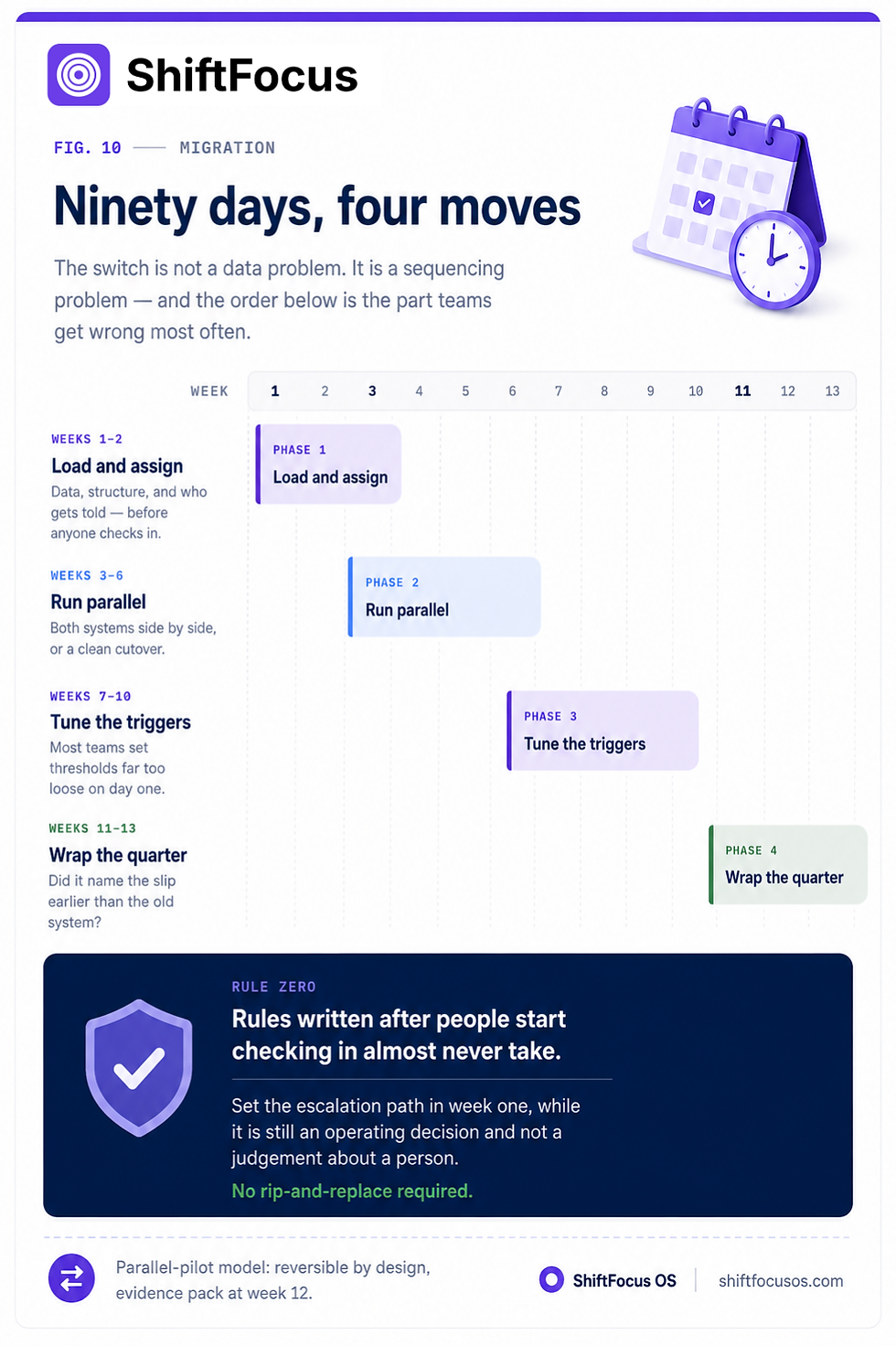
Weeks 1-2: Introduce the data, establish the company structure, and assign who is notified of problems before people begin using the system. The rules that are established after people start checking in rarely work.
Weeks 3-6: Run both old and new systems together, unless your rules state otherwise. If not, just switch over completely so people have to use it for real.
Weeks 7-10: Review the alerts you'd received and tweak your settings, as most teams set the triggers too loosely initially.
Week 11-13: Convene a wrap-up meeting for the quarter to see if the new system identified delays earlier than the old system.
TABLE 13 · MIGRATION MODEL
How the switch is structured
Quantive | ShiftFocus | |
Parallel pilot | Rip-and-replace | Run both, 90 days |
Existing OKRs | Export and rebuild | Hierarchies and targets imported |
Historical check-ins | Lost in transition | Imported, trend reporting continues |
Pilot scorecard | None | Weekly metrics, go/no-go pack |
Reversibility | Committed on day one | Reversible by design |
TABLE 14 · INTEGRATIONS
Whether enforcement reaches where work happens
Quantive | ShiftFocus | |
Slack / Teams | Notifications | Check-ins happen in-channel |
Jira / Linear | Sync | Two-way sync with writeback |
Calendar | No | Update windows block time |
Salesforce | Connector | Pipeline signal tied to execution health |
SSO / SCIM | Yes | Okta, Azure AD, Google Workspace |
Webhooks / API | Yes | Yes, plus Zapier |
TABLE 15 · GOVERNANCE AND SECURITY
What procurement will ask about
Quantive | ShiftFocus | |
Role-based permissions | Yes | Org, workspace and team level |
Audit logs | Yes | Sign-in, admin, permission, status changes |
Encryption | Standard | TLS 1.3 in transit, AES-256-GCM at rest |
Certification | Inherited post-acquisition | SOC 2 Type I in progress; quarterly pentests |
Data retention and export | Yes | Configurable, self-service export |
Who Should Stay on Quantive
Not every team needs to move immediately, migration timeline aside. If your primary need is retrospective reporting for a board or leadership team a clean visual record of what happened last quarter and you're not trying to change in-quarter behavior, the reporting strength that made Quantive popular still has value, at least until the WorkBoard transition wraps up.
Teams with no appetite for a structured weekly cadence, or without a manager layer willing to act on escalations, won't get more value from an enforcement-first tool. Enforcement only works when someone is actually prepared to enforce.
TABLE 16 · STAY OR SWITCH
The honest split
Quantive | ShiftFocus | |
Board wants a clean retrospective record | Stay | Not the primary use case |
No manager layer willing to escalate | Stay | Enforcement has nowhere to land |
Quarter-end surprises are recurring | Won't fix it | This is the target symptom |
No dedicated strategy PMO | Struggles | Designed for it |
Cross-functional dependencies dominate | Partial | Core |
Who Should Switch
The clearest fit for a Quantive alternative built around enforcement is the 50-500 person cross-functional organization big enough that no single person has visibility into every team's OKRs, and small enough that a formal PMO with dedicated headcount for goal-chasing doesn't exist.
If your leadership team is repeatedly surprised at quarter-end by objectives that "seemed fine" two weeks earlier, that's the specific symptom enforcement tooling is built to catch. The surprise is almost always a silence problem, not a data problem the information existed, but nobody was made to act on it in time.

FAQs
Is Quantive (formerly Gtmhub) good for OKRs?
It was a robust enterprise OKR platform with genuine strengths in data integration and executive reporting. It is currently being acquired and integrated into WorkBoard's platform, and as of May 2025, it will no longer be actively developed.
Why do teams switch away from Quantive?
The most common reasons for switching are the forced WorkBoard migration and a more established trend of tracking with dashboards failing to prevent adoption decay or to identify stalled objectives in time for the end of the quarter.
What's the difference between OKR tracking and enforcement?
Tracking records status and displays it. Enforcement identifies risk, such as stale updates, aging dependencies, and missed check-ins and directs the risk to a specific individual with a deadline instead of waiting for a person to open a dashboard.
Does ShiftFocus import existing OKRs?
Yes. Objective hierarchies, key result targets, and historical check-in data can be imported, allowing trend reporting to continue without having to start from scratch.
Which is better for 50-500 person teams?
An enforcement-first platform like ShiftFocus is likely to close more of the "surprised at quarter-end" gap than a pure tracking-and-reporting platform, especially for teams that are cross-functional at this scale, without a dedicated strategy PMO.

TABLE 17 · PILOT SCORECARD
What gets measured before you commit
Quantive | ShiftFocus | |
Time to first signal | Quarter-end | 2–3 weeks before the deadline |
Late escalations per month | Not tracked | Counted before and after |
Exec review time per week | Hours | Minutes |
QBR prep per quarter | Manual compilation | Auto-generated brief |
Intervention success rate | Not measured | Score change after intervention |


Comments