%20(3).png)
Traction Tools Review and Alternatives (2026)

In the past, Traction Tools (now Bloom Growth) was the number one software for EOS, but that is not the case anymore, as there are now better options available.
Here, we’ll review multiple Traction tools and provide useful information on which Traction Tools do well, which doesn't, and which alternative is the best fit for your team's needs.
What Traction Tools is and Who Still Uses it in 2026
Traction Tools was the original software built exclusively for the Entrepreneurial Operating System (EOS). It was the digital home of EOS companies for years, allowing for easy running of Level 10 meetings, monitoring of Rocks, and V/TO management.
Today, the platform operates under the new name, Bloom Growth. Most of the teams that are still using it are the ones that have been using it for years. They are usually "EOS-pure" organizations where the framework is important, and the workflow is deeply rooted in the original tool. If you're a company that has been using EOS for more than 5 years and you don't feel the need to change, you're most likely still in the Bloom Growth stage. But as your business grows, you will start to see its shortcomings.
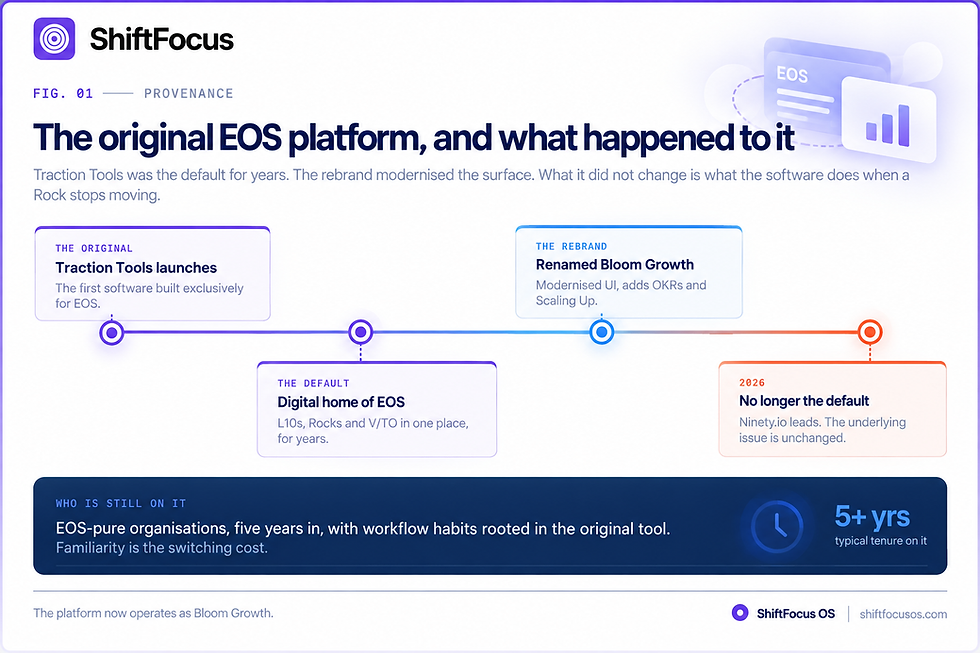
TABLE 01 · IDENTITY
What the platform is now, and who is still on it
Traction Tools / Bloom | Ninety.io | ShiftFocus | |
Original positioning | The first EOS-only platform | Modern EOS market leader | Execution enforcement layer |
Current name | Bloom Growth | Ninety. io | ShiftFocus |
Frameworks supported | EOS, plus OKRs and Scaling Up | EOS | EOS, OKRs, hybrid |
Typical remaining user | EOS-pure, 5+ years in, deep workflow habits | Teams adopting EOS now | Teams with a follow-through problem |
Active development | On Bloom Growth | Active | Active |
Traction Tools Pricing and What's in Each Tier
Traction Tools does not offer public per-user pricing on its website. However, historical data and current market comparisons reveal the price range.
The entry-level plan historically starts around $249/month, which typically covers a small team of up to 10 users. For more users, the cost scales significantly per seat.
The pricing structure is a major friction point for growing companies. It actively discourages you from rolling out the tool company-wide. You end up limiting access, which defeats the purpose of a "one platform" operating system.
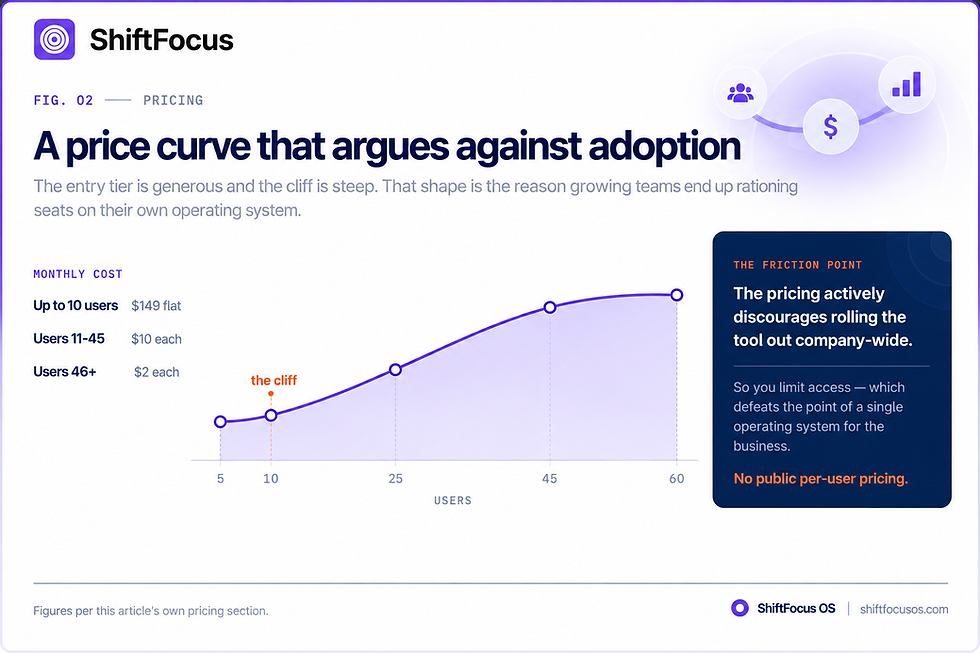
TABLE 02 · PRICING
What each tier costs and what it discourages
Traction Tools / Bloom | Ninety.io | ShiftFocus | |
Entry plan | $149/month flat, up to 10 users | About $10 per user (Essentials) | About $19 per user |
Users 11–45 | $10 per person per month | Tier-dependent | Flat per seat |
Users 46+ | $2 per person per month | Tier-dependent | Flat per seat |
Cost at 15 users | About $199/month | About $150–$240/month | About $285/month |
Public per-user pricing | Not published | Published | Published |
Practical effect | Discourages company-wide rollout | Rollout is affordable | Rollout is the point |
What Traction Tools Does Well: Pure EOS Fidelity, Nothing Extra
The core strength of Traction Tools is its absolute fidelity to the EOS methodology. It follows the "Traction" book almost chapter by chapter. It is designed to guide your team through the Level 10 meeting process with strict discipline.
If your main problem is that your team goes on tangents, the rigid structure of the L10 tool is effective. It captures Issues and To-Dos efficiently and helps you run meetings cleanly. It is a "box" for your EOS data, and for teams lacking operational discipline.
TABLE 03 · EOS FIDELITY
The genuine strength, stated plainly
Traction Tools / Bloom | Ninety.io | ShiftFocus | |
Follows the Traction book | Almost chapter by chapter | EOS-native, modernised | EOS-compatible, enforcement-first |
Meeting discipline | Rigid stops tangents | Structured, lighter touch | Brief-driven |
Issues and To-Dos capture | Efficient | Efficient | Routed to named owners |
Best when the problem is | Your team goes on tangents | Your team will not open the tool | Your team will not follow through |
Where Teams Outgrow it: Reporting, Projects, and Follow-Through
This is where the platform loses its shine. It's used to keep track of Rocks, but not much to enforce them. It is designed to be used by people who already have good working practices and will only be used to capture what they are doing wrong, not to prevent them from doing it. When a team member does not respond to a critical To-Do, the tool is passive.
Functionality is not extensive beyond the EOS framework:
Reporting: It has a poor reporting system. Custom charts are not available to analyze progress or to find bottlenecks.
Project Execution: It is used for tracking Rocks, but is not good at handling complex projects. The platform was not built for project management.
UI: The user interface is too heavy and too cluttered. Users complain of wasting time in menus rather than using them to solve problems.
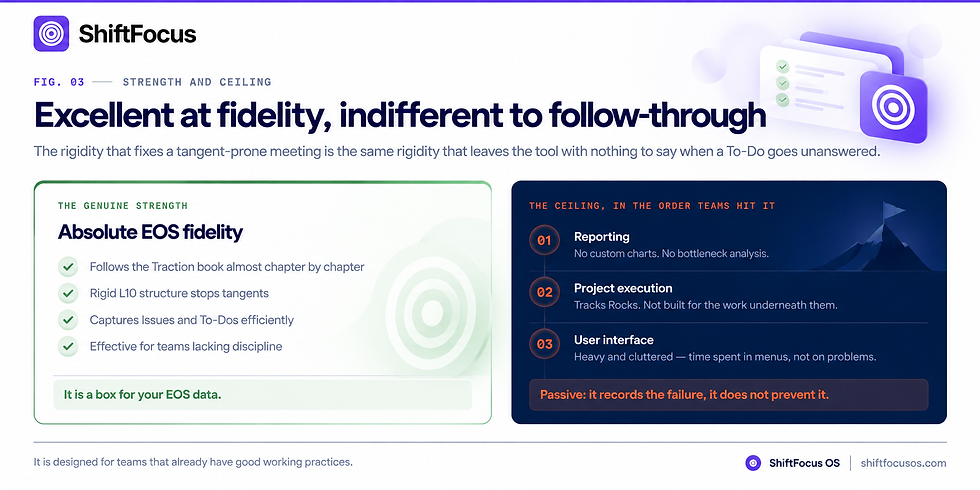
TABLE 04 · WHERE TEAMS OUTGROW IT
Three ceilings, in the order teams hit them
Traction Tools / Bloom | Ninety.io | ShiftFocus | |
Reporting | Poor no custom charts | Improving; restrictive at depth | Auto-generated exec brief |
Project execution | Not built for it needs a second tool | Improving via integrations | Tasks inherit goal cadence |
User interface | Heavy and cluttered | Responsive and clean | Check-ins in Slack or Teams |
Bottleneck detection | Not available | Limited | Dependency and congestion surfacing |
Behaviour when a To-Do is ignored | Passive records the failure | Passive | Escalates automatically |
Traction Tools vs Ninety.io The Head-to-Head Most Buyers Actually Run
This is the comparison most EOS teams make. Ninety.io is currently the market leader, and for good reason. Unlike Traction Tools, Ninety was designed with modern users in mind. The onboarding is faster; you can have your first meeting up within minutes.
The "Feeling" Difference: Ninety feels responsive and clean. Traction Tools feels dated.
The Execution Difference: Ninety emphasizes execution visibility. It ties Rocks to the dashboard and your meetings effectively. Traction Tools treats Rocks more like formalities.
The Size Limit: While Ninety is great, it even has a ceiling for large organizations. Once you need deep custom reporting, it can feel restrictive. For teams under 100 employees, Ninety generally provides a superior experience.
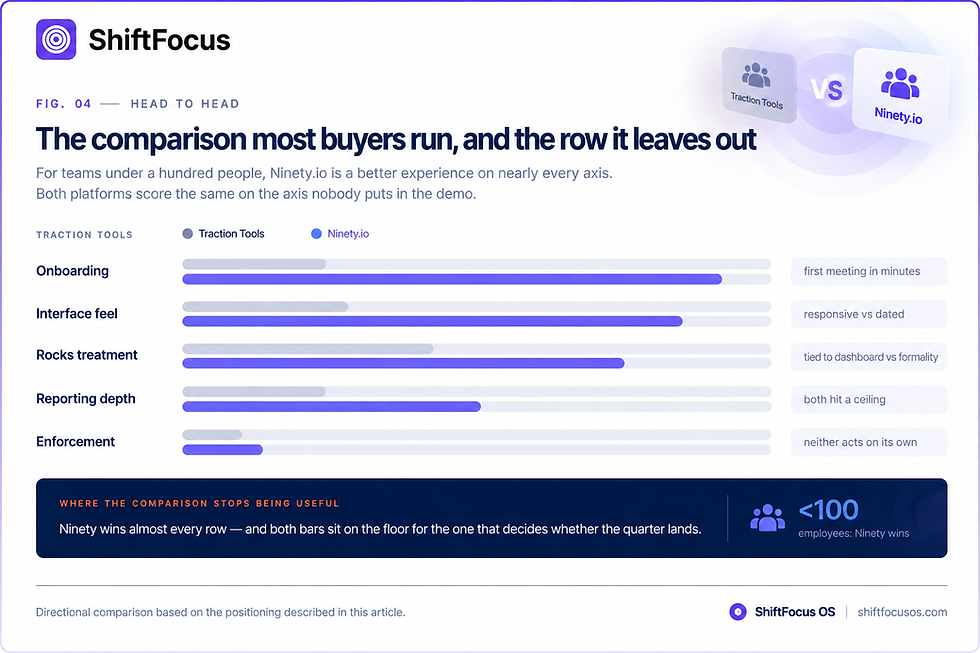
TABLE 05 · THE HEAD-TO-HEAD MOST BUYERS RUN
Traction Tools against Ninety.io
Traction Tools / Bloom | Ninety.io | ShiftFocus | |
Onboarding speed | Slow dated interface | First meeting in minutes | 90-day parallel pilot |
How it feels | Dated | Responsive and clean | Mostly invisible lives in chat |
Treatment of Rocks | More like formalities | Tied to dashboard and meetings | Risk-scored and escalated |
Ceiling | Reporting and projects | Deep custom reporting at scale | — |
Best under 100 employees | Legacy familiarity only | Superior experience | When follow-through is the gap |
Traction Tools vs Bloom Growth
The company that built Traction Tools rebranded it to Bloom Growth. The newer version (Bloom Growth) attempts to expand beyond pure EOS. It now supports other frameworks like OKRs and Scaling Up. It adds features around leadership development and coaching workflows. However, the rebranding didn't solve the underlying issue: it still feels like a platform that was designed to be comprehensive but is often considered clunky and less intuitive compared to Ninety.
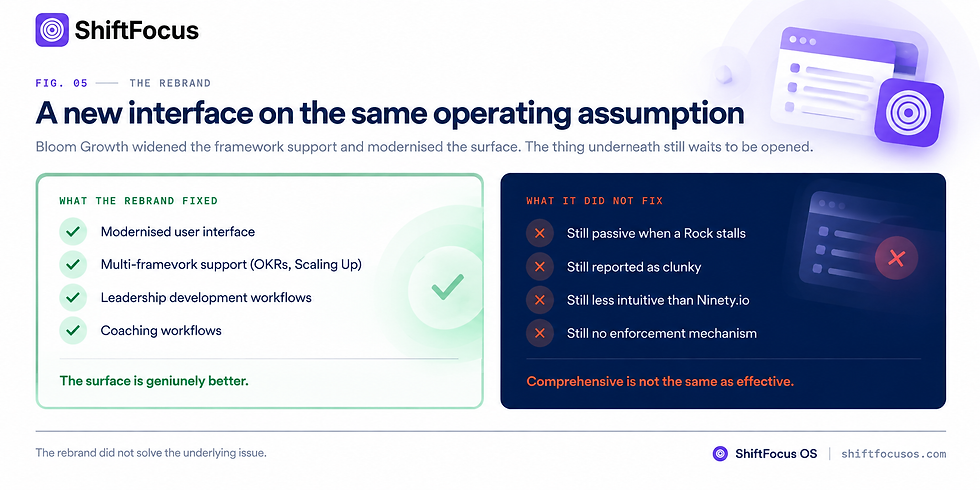
TABLE 06 · TRACTION TOOLS VS BLOOM GROWTH
What the rebrand did and did not fix
Traction Tools / Bloom | ShiftFocus | |
Interface | Dated and cluttered | Modernised UI |
Framework support | EOS only | EOS, OKRs, Scaling Up |
Added capability | — | Leadership development and coaching workflows |
The underlying issue | Passive records, does not enforce | Still passive |
Reported feel | Clunky | Still clunky and less intuitive than Ninety |
Traction Tools vs Align
Align skips EOS jargon and instead centers on four key areas: strategy, communication, goal tracking, and culture. It provides planning documents, meeting tools, and a special employee sentiment tracker known as eNPS something that competitors do not have.
The prices aren't made public. Align offers annual contracts with customized quotes, but here's a tip: EO members receive a 25% discount.
The actual decision depends on the methodology you choose. In the case where your team fully embraces EOS using Rocks, Scorecards, and L10s, Align's general terminology might seem awkward, and you'll have to keep translating it. On the other hand, if you combine EOS with other frameworks such as Scaling Up, then the flexibility of Align becomes a significant advantage since it adjusts to your needs rather than you having to adjust to it.
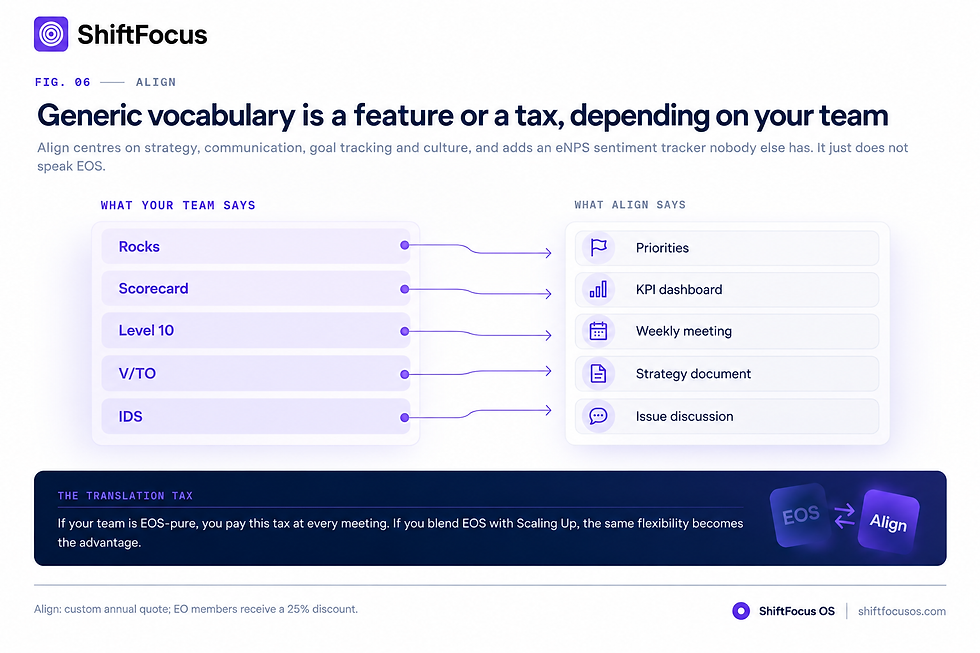
TABLE 07 · TRACTION TOOLS VS ALIGN
Terminology is the real decision
Traction Tools / Bloom | Ninety.io | ShiftFocus | |
Vocabulary | Rocks, Scorecard, L10, V/TO | Rocks, Scorecard, L10, V/TO | Goal, owner, cadence maps to either |
Focus areas | EOS fidelity | Strategy, communication, goal tracking, culture | Execution enforcement |
Unique feature | — | eNPS employee sentiment tracking | Predictive risk scoring |
Pricing | $149/month entry | Custom annual quote; 25% EO member discount | About $19 per user |
Right when | Your team is EOS-pure | You blend EOS with Scaling Up | Follow-through is the failure point |
Traction Tools vs ShiftFocus: Tracking the Rock vs Enforcing it
ShiftFocus takes a radically different approach to EOS. Where Traction Tools tracks your progress, ShiftFocus proactively enforces it.
ShiftFocus is built specifically to prevent execution failure. It has features that automatically escalate stalled goals and predict failure 2–3 weeks early. Traction Tools assumes you are disciplined; ShiftFocus makes you disciplined.
If you have a team that struggles with follow-through, Traction Tools won't fix the behavior it will just record the failure. ShiftFocus is the "enforcer" tool, designed to sound the alarm when Rocks go off track.
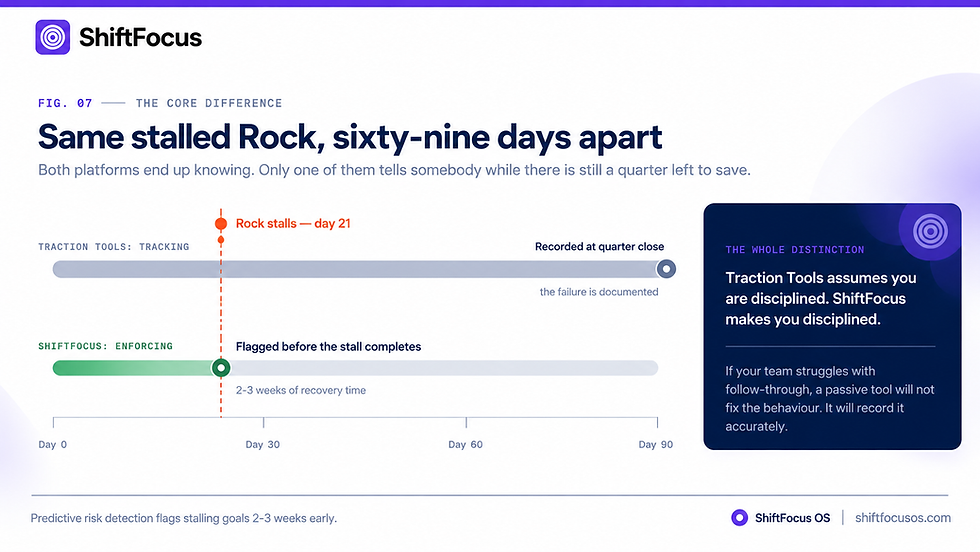
TABLE 08 · TRACKING VS ENFORCING
The distinction the whole category turns on
Traction Tools / Bloom | ShiftFocus | |
What it does with a stalled Rock | Records the failure | Sounds the alarm before it fails |
Timing of the signal | After the fact | 2–3 weeks early |
Assumption about your team | Assumes you are disciplined | Makes discipline structural |
Escalation | Manual | Automatic to owner and manager |
Effect on behaviour | None it is a box for data | Changes what happens next |
The five-column comparison table
Feature / Metric | Bloom Growth (Traction Tools) | Ninety.io | Align | EOS One (official) |
Starting price | $149/mo flat, up to 10 users | ~$10/user/mo (Essentials) | Custom annual contract | Free for 1 user, $10/user/mo after |
Price at 15 users | ~$199/mo | ~$150–240/mo depending on tier | Negotiated | ~$140/mo |
L10 meeting flow | Native, purpose-built agenda | Native, customizable agenda | Generic meeting template | Native, one-click prep/recap |
Rocks tracking | Yes, with milestones | Yes, with milestones + AI drafting | Yes, generic "priorities" language | Yes, drop-to-Issues in one click |
Scorecard | Weekly sync into meeting view | Weekly sync + Insights reporting | Custom KPI dashboards | Basic scorecard, tied to Rocks |
Project execution depth | Weak needs a second tool | Improving via 2025 integrations | Weak, planning-focused | Weak intentionally minimal |
TABLE 09 · WHAT THE FIVE-COLUMN TABLE DOES NOT MEASURE
Capability, not features
Traction Tools / Bloom | Ninety.io | ShiftFocus | |
Predicts a Rock will miss | No | No | 2–3 weeks early |
Escalates without a human | No | No | Yes |
Explains why a goal is at risk | No | No | Missed check-ins, velocity decay, dependency age |
Tracks who delivers over time | No | No | Accountability heatmap |
Generates the meeting brief | No | Partial | Auto-generated weekly |
TABLE 10 · REPORTING DEPTH
Where the walls close in
Traction Tools / Bloom | Ninety.io | ShiftFocus | |
Custom charts | Not available | Insights reporting, restrictive at depth | Auto-generated brief plus risk queue |
Bottleneck analysis | No | Limited | Congestion and dependency surfacing |
Weekly exec summary | Manual | Manual | Auto-generated |
Intervention history | Not tracked | Not tracked | Logged with outcome impact |
How to Switch Off Traction Tools Without Losing a Quarter
Switching EOS platforms is a pain. Your team is trained, the data is in, and workflows are running. For most teams, the smart strategy is to not jump off the platform and onto a different one, but rather to build an "AI layer" that sits on top of the existing base.
If you've made up your mind to change, you can do so without losing a quarter of momentum.
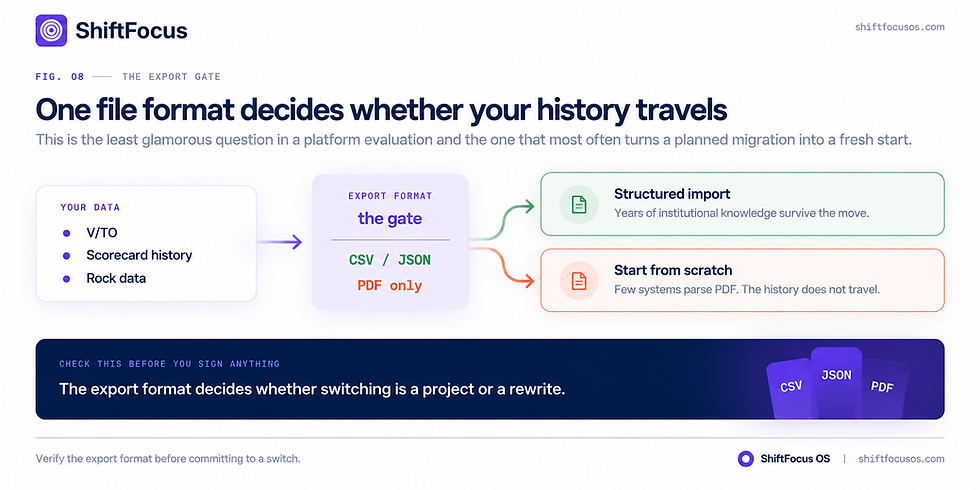
TABLE 11 · EXPORT FORMATS
The detail that decides whether a switch is possible
Traction Tools / Bloom | Ninety.io | ShiftFocus | |
V/TO export | Verify the format first | Supported | Import supported |
Scorecard history | Verify the format first | Supported | Trend reporting continues after import |
Structured CSV or JSON | Must be confirmed | Available | Accepted |
PDF-only export | A real restriction few systems parse it | — | — |
Export Everything: Export your V/TO, Scorecard history, and Rock data. If you can only export to PDF, that's a restriction, since fewer systems can handle PDF files.
Run Parallel: Test the new software for one month alongside the old software. Utilize your L10 meetings within the new platform, but retain the old platform as a backup.
Data Migration: You must find a way to export your existing data in a structured manner (ideally as a CSV or JSON file) that the new platform can import. Otherwise, you have to do everything from scratch and waste all those years of institutional knowledge.
Train on Behavior: Training is not about the software's new features; it is about the new behavior. Make your team aware of how the new platform impacts their everyday jobs, not just the location of the buttons.
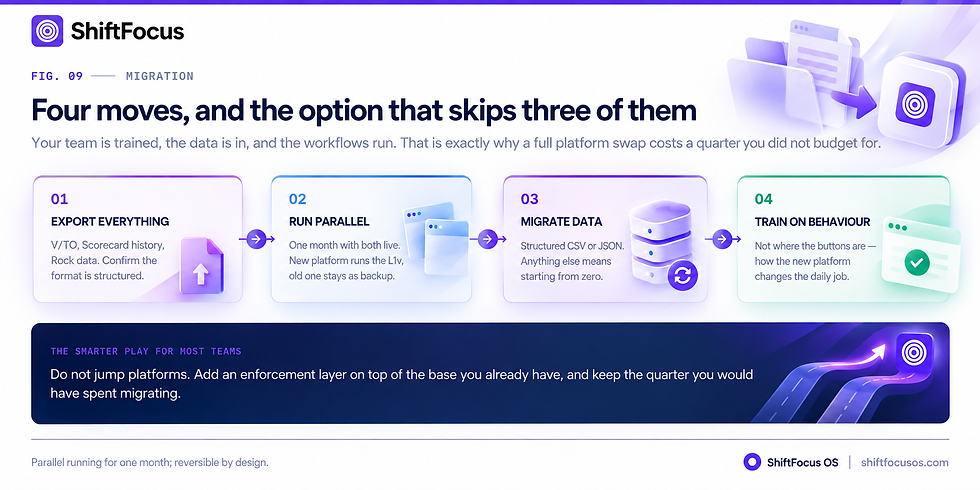
TABLE 12 · THE SWITCH PLAN
Four moves, in order
Traction Tools / Bloom | Ninety.io | ShiftFocus | |
Step 1 Export everything | V/TO, Scorecard history, Rock data | — | Import at setup |
Step 2 Run parallel | Keep as backup for one month | — | 90-day parallel pilot, no rip-and-replace |
Step 3 Migrate data | Structured CSV or JSON only | — | Hierarchies, targets, history |
Step 4 Train on behaviour | Not where the buttons are | — | Cadence is enforced, not taught |
TABLE 13 · THE LAYER OPTION
Adding enforcement without a migration
Traction Tools / Bloom | ShiftFocus | |
Existing platform | Stays in place | Sits on top |
Team retraining | None required | Check-ins move to Slack or Teams |
Quarter of momentum lost | None | None |
What changes | Nothing | Silence gets scored; drift gets escalated |
Reversibility | — | Parallel pilot is reversible by design |
FAQs
What is the best Traction Tools alternative?
The best alternative depends on your team's needs. If you want the modernized version of the same tool, Bloom Growth is your direct path. If you want the current market leader with the best user experience, choose Ninety.io. If you have a follow-through problem, ShiftFocus is an excellent choice for enforcing accountability.
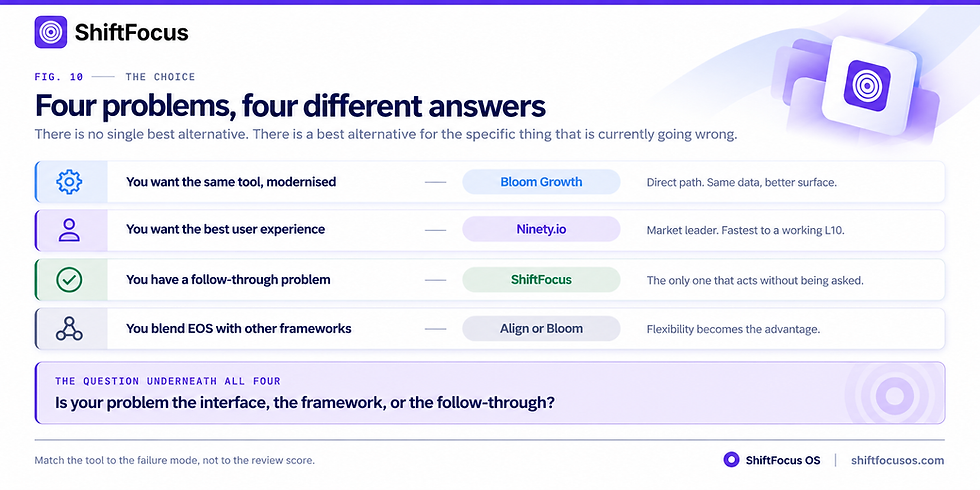
TABLE 14 · PICK BY PROBLEM
Four situations, four answers
Traction Tools / Bloom | ShiftFocus | ||
You want the same tool, modernised | Bloom Growth | — | — |
You want the best user experience | — | Ninety.io | — |
You have a follow-through problem | Records it | Displays it | Enforces against it |
You blend EOS with other frameworks | Bloom Growth or Align | EOS only | Framework-agnostic |
How much does Traction Tools cost per user?
The original Traction Tools starts at $149/month for up to 10 users. Additional users cost $10 per person per month (for 11-45 users) and $2 per person per month for 46 or more.
Is Ninety.io better than Traction Tools for running EOS?
Yes, for most teams. Ninety.io is more intuitive and has a better user interface, leading to higher user adoption. The original Traction Tools can feel "heavy and cluttered," which leads to users working around it.
Does Traction Tools handle projects, or only Rocks?
It is not a true project management tool. It tracks "Rocks" (quarterly goals) but is not designed to manage the day-to-day tasks and complex project execution necessary to achieve them.
TABLE 15 · PROJECT EXECUTION
Rocks are quarterly goals, not project plans
Traction Tools / Bloom | Ninety.io | ShiftFocus | |
Rock tracking | Yes, with milestones | Yes, with milestones and AI drafting | Yes, with risk scoring |
Day-to-day task management | Not designed for it | Improving via integrations | Tasks inherit the goal's cadence |
Complex project execution | Needs a second tool | Needs a second tool | Jira and Linear two-way sync |
Dependency between teams | Not modelled | Limited | Cross-team dependency engine |
Is Traction Tools still being actively developed?
The original "Traction Tools" brand has been rebranded to Bloom Growth. The current active development is happening on the Bloom Growth platform, which offers a modernized UI and multi-framework support.
Can I export my V/TO and Scorecard history out of Traction Tools?
Yes, but you need to verify the export format. It must be a structured format like CSV or JSON. If the platform only exports to PDF, it will be difficult for a new AI agent or platform to parse that data.
Which EOS software is easiest for a leadership team of 10?
For a team of 10, Ninety.io is widely cited as the easiest. It has a clean interface and requires almost no training to get an L10 meeting up and running, which is critical for maintaining focus and momentum.
TABLE 16 · EASE FOR A LEADERSHIP TEAM OF TEN
The most common buying scenario
Traction Tools / Bloom | Ninety.io | ShiftFocus | |
Training required | Moderate heavy interface | Almost none | Minimal updates happen in chat |
Time to first L10 | Longer | Minutes | Runs alongside your existing meeting |
Monthly cost at 10 users | $149 flat | About $100–$160 | About $190 |
Who keeps the team honest | The Implementer | The Implementer | The system |


Comments